Granite Identifier
Instantly analyze and recognize granite types, textures, and minerals with our free AI-powered online tool.
Identification form
Upload granite photos
Clear, well-lit images help the AI identify it more accurately.
Unlock Unlimited Access
- Unlimited Identifications
- Unlimited AI Chat Messages
- Save and Organize Your Collection
How to Use the Granite Identifier
- 1
Snap a Clear Photo
Click "Upload Images" to select a photo. For the most accurate granite analysis, ensure the stone is well-lit (natural daylight is best) and free from glare, especially if identifying a polished countertop.
- 2
Capture Details & Angles
Upload extra photos to help the AI. Close-ups of the crystal grain, distinctive mineral specks (like black mica or pink feldspar), and the overall pattern provide vital clues.
- 3
Provide the Location
Tell us where the granite was found. Context matters—a sample from a quarry in Brazil is geologically different from a rock found in the Rocky Mountains.
- 4
Add Observations
Input specific traits to narrow down the results. Note the texture (is it fine-grained or coarse?), finish (polished or rough?), and dominant colors.
- 5
Get Instant Results
Click "Identify Granite" to start the analysis. Our tool will compare your photos against thousands of geological samples to provide the closest matches.
Ready to identify it?
Upload one or more clear photos to get started.
The Geology of Granite
Granite is one of the most common and recognizable types of igneous rock found on Earth's surface. Formed from the slow cooling of magma beneath the crust, it is renowned for its durability and distinctive grainy appearance. The name itself comes from the Latin word 'granum,' meaning grain, which refers to the coarse texture visible to the naked eye. When you use a granite identifier, you are essentially analyzing the interplay of various minerals that crystallized together over millions of years.
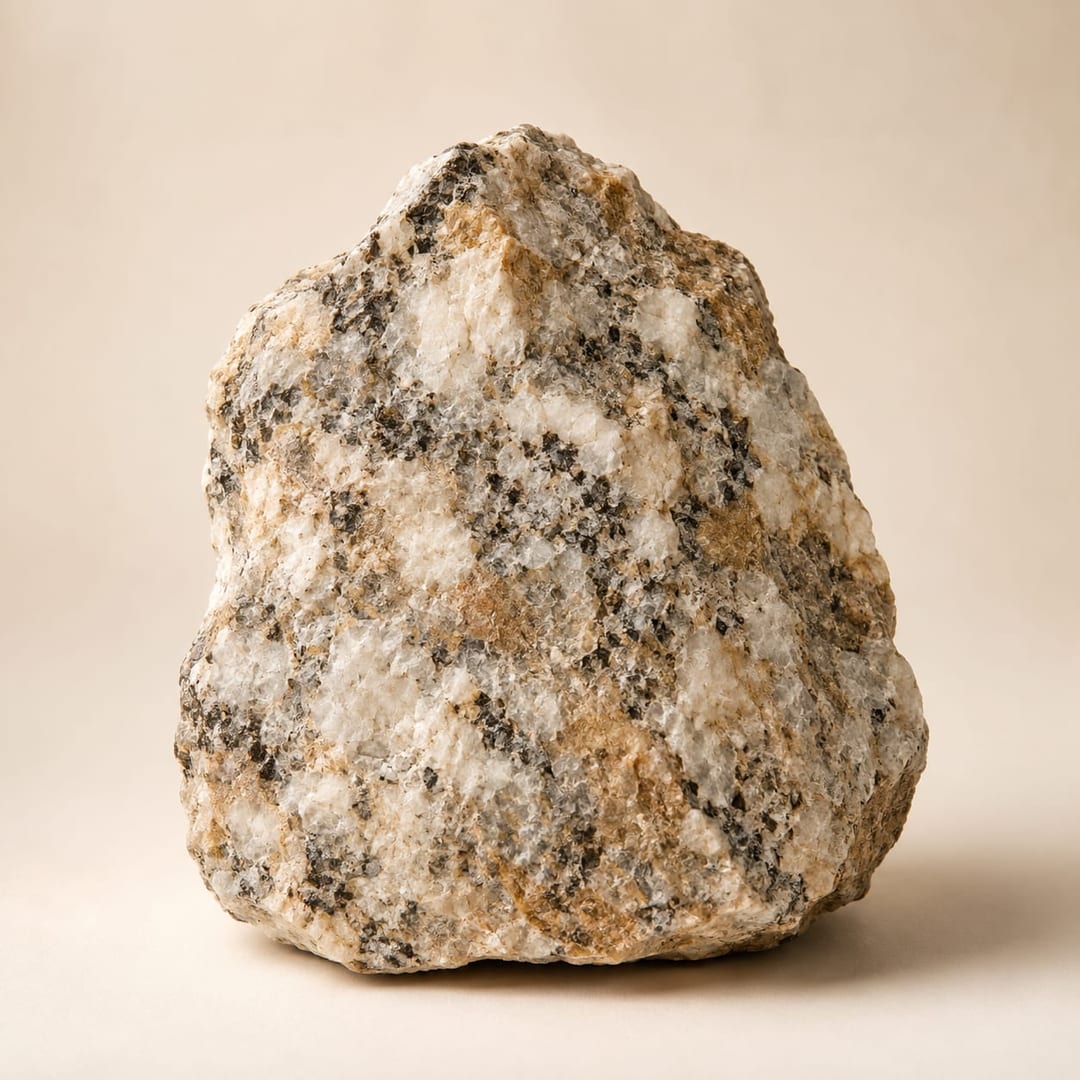
The composition of granite is primarily dominated by two minerals: quartz and feldspar. Quartz usually appears as grey or glassy grains, while feldspar can range from distinct whites and pinks to deep reds, giving the stone its primary color palette. Darker specks scattered throughout the rock are typically mica (biotite or muscovite) or amphibole. Understanding these mineral components is key to accurate identification. Our web application simplifies this complex geological assessment by using advanced visual recognition to parse these patterns instantly from a simple digital image.
Reading the Grains: Texture and Color
Identifying granite requires a keen eye for texture and pattern. Unlike sedimentary rocks that may show layers, or metamorphic rocks that often display foliation (banding), granite is phaneritic, meaning its individual crystals are large enough to be seen without magnification. This random, interlocking crystal structure is a hallmark of intrusive igneous formation. When you upload a photo to our online platform, the algorithm scans for this specific 'salt and pepper' arrangement which is characteristic of granitic rocks.
Color is another vital diagnostic feature. The specific hue of a sample tells a story about its mineralogy. For instance, a high concentration of potassium feldspar results in a pinkish or reddish stone, often seen in monuments. Conversely, granite rich in plagioclase feldspar tends to be lighter, often appearing off-white or light gray. The presence of dark minerals like hornblende adds contrast. By examining these color ratios, our free system helps distinguish true granite from similar-looking stones like diorite or gabbro, providing a precise analysis for collectors and homeowners alike.
Commercial Stone vs. Geological Definition
In the world of construction and interior design, the term 'granite' is often used loosely. Commercially, it might encompass a wide variety of hard, durable stones used for countertops, including gneiss, monzonite, and sometimes even darker igneous rocks like gabbro (often sold as 'black granite'). While these stones share similar physical properties—such as high hardness and resistance to scratching—they differ geologically. A geological granite identifier focuses on the strict definition: a rock containing 20% to 60% quartz and a specific balance of feldspars.
Our best automated solution helps bridge the gap between commercial labels and geological reality. Whether you are inspecting a kitchen island or a raw specimen in the field, knowing the true classification can be fascinating. For instance, many 'granite' countertops with flowing, wavy patterns are actually gneiss, a metamorphic rock. By using an image-based guide, users can better understand the material they are working with. This distinction is crucial not just for curiosity, but for understanding how the stone might react to sealants, acids, or wear over time.
Why Use AI for Rock Identification?
The traditional method of identifying rocks involves scratch tests, streak plates, and sometimes even chemical acid tests. While these methods are definitive, they are not always practical for the average enthusiast or a homeowner trying to match a tile. This is where AI-driven technology revolutionizes the process. By leveraging machine learning models trained on thousands of geological samples, our platform offers a non-destructive way to analyze stone.
Using this no-cost resource allows for immediate results without the need for heavy textbooks or specialized equipment. The AI looks for subtle features in crystal habit and cleavage that might be missed by an untrained eye. While no digital replacement is 100% perfect compared to a lab analysis, it serves as an incredible starting point for discovery. Whether you are a student, a landscaper, or a rockhound, accessing this powerful utility through your browser ensures you can categorize and catalog your finds efficiently and accurately.
Put what you’ve learned to use
Upload your photos and compare the suggested match with the features you observed.
Frequently Asked Questions
Is this granite identifier free to use?
Yes, the granite identifier is free to use, with a generous daily allowance of identifications and no sign-up required. For unlimited identifications, unlimited AI chat, and saved collections, you can upgrade to IdentifyRock Unlimited.
Do I need to download an app to use this tool?
No, this is a web-based identifier. You do not need to download or install any app. Simply access our website from your browser on any device to identify granite instantly.
How accurate is the AI at identifying granite?
Our AI is trained on a vast database of geological images and is highly effective at recognizing common granite varieties. However, identification accuracy depends on photo quality and the distinctiveness of the stone's grain and mineral composition.
Can I use this tool to identify my kitchen countertops?
Absolutely. This tool is excellent for homeowners looking to identify the specific type or commercial name of their granite countertops based on visual patterns and color variations.
Do I need to sign up or create an account?
No, we prioritize ease of use. You can use the granite identifier immediately without registering, signing up, or providing an email address.
What kind of photos work best for identification?
Clear, well-lit photos work best. Avoid flash glare on polished surfaces. Take one photo showing the overall pattern and another close-up macro shot showing the individual mineral grains.
Can it distinguish between granite and marble?
Yes, the AI analyzes texture and pattern. Granite typically has a speckled, granular appearance, while marble usually features veining. The tool helps distinguish these visual differences effectively.
Is there a limit to how many photos I can upload?
There are no strict limits on the number of sessions. You can use the granite identifier as many times as you like to analyze different samples or verify results.
Does it identify the specific minerals inside the granite?
While the primary goal is to identify the rock type, the analysis often highlights visible mineral constituents like quartz, feldspar, and mica based on their color and crystal shape.
Can I use this tool on my mobile phone?
Yes, our website is fully optimized for mobile devices. You can take a picture directly with your phone camera and upload it to the identifier for instant results.
What if the rock is dirty or covered in moss?
For the best results, try to clean a small section of the rock before taking a picture. Dirt, moss, or weathering can obscure the grain structure necessary for accurate identification.
Is this tool suitable for professional geological surveys?
While our AI provides a high-level identification helpful for preliminary analysis, professional geological surveys should always rely on physical testing (hardness, streak, chemical) alongside visual tools.
Ready to give it a try?
Upload your photos for an AI-assisted best match.